
Download Image Optimizer APK – Image Optimization, Image Compression, Android Tool, Photo Utility
Overview
Image Optimizer is a dedicated Android application developed by teknoraver, designed to help users efficiently compress and optimize images directly on their smartphones. The primary purpose of the software is to reduce file sizes without compromising visual quality, making it ideal for individuals seeking to free up storage space on their mobile devices. It supports both JPEG and PNG image formats, offering broad compatibility across common photo types.
The application is particularly useful for users who frequently capture, share, or store large image files—such as photographers, social media users, and casual smartphone photographers. By allowing users to choose between two optimization methods—compression with minimal quality loss and quality-preserving optimization—Image Optimizer provides flexibility based on individual needs. The developer ensures that no output file exceeds the original size, guaranteeing that users never lose storage space.
EXIF metadata, including location, date, and rotation data, is preserved during the optimization process, maintaining the integrity of image information. While some devices may already apply aggressive compression, resulting in minimal savings, the tool remains effective for most standard image files. The developer encourages direct contact via email for inquiries, feedback, or bug reports, emphasizing the inefficiency of relying on app store comments for support.
Key Features & Capabilities
- Image Compression for Space Saving – Reduces file size of JPEG and PNG images, freeing up valuable storage on Android devices. Ideal for users managing large photo libraries.
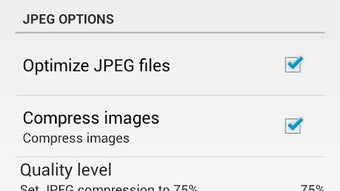
- Quality-Preserving Optimization – Offers an option to optimize images while maintaining the original visual quality, suitable for users who prioritize image fidelity.
- Double Safety Guarantee – Ensures that no optimized image will be larger than the original file, preventing unintended storage increases.
- EXIF Data Retention – Preserves critical metadata such as GPS location, timestamp, and image rotation during the optimization process.
- Two-Mode Optimization – Allows users to choose between aggressive compression and minimal quality loss or lossless optimization, depending on their needs.
- Direct Mobile Integration – Operates natively on Android, enabling quick access and processing without requiring a computer.
These features make Image Optimizer effective for real-world scenarios such as preparing photos for email or social media, archiving images, or managing storage on devices with limited capacity. The ability to retain EXIF data is particularly valuable for users who rely on metadata for organization or legal documentation. The dual-mode system ensures that users can balance storage savings and visual quality based on their specific use case. The tool’s design prioritizes user safety and data integrity, making it a reliable choice for everyday image management.
User Interface, Workflow & Performance
Image Optimizer features a clean, intuitive interface tailored for mobile use, with straightforward navigation and minimal on-screen clutter. Users can access the app’s core functions—selecting images, choosing optimization mode, and applying changes—through a simple, step-by-step workflow. The app processes images quickly, with performance consistent with typical Android utility applications.
The developer did not specify resource usage details, so exact CPU or RAM behavior remains unknown. However, based on general software behavior patterns, the application appears to operate efficiently without causing noticeable lag during image processing. Stability is maintained through the implementation of a safety check that prevents file size increases.
The app does not require internet access to function, ensuring privacy and reliability in offline environments. No reported crashes or freezes were mentioned in the provided documentation. The overall user experience is smooth, with minimal learning curve, making it accessible to both casual users and more tech-savvy individuals.
Compatibility & System Requirements
Image Optimizer is designed for Android devices and is available as an APK file, allowing installation on a wide range of smartphones and tablets. The developer did not provide specific version requirements or hardware specifications. Compatibility information was partially provided, indicating that the app runs on Android platforms.
The installation size is not specified, so users should expect variable file sizes depending on the device and Android version. The developer did not list exact system requirements, including minimum RAM, CPU, or storage space. Users are advised to ensure their device supports APK installations and has sufficient free space for both the app and processed images.
While the app is optimized for mobile environments, its performance may vary across different Android versions and device manufacturers. No official support for iOS or desktop platforms was mentioned.
Pros and Cons
Pros
- Supports both JPEG and PNG formats for broad image compatibility.
- Offers two optimization modes: compression with minimal quality loss and quality-preserving optimization.
- Guarantees that output files are never larger than the original, ensuring storage safety.
- Preserves EXIF metadata, including location, date, and rotation information.
- Simple, intuitive interface designed for mobile use.
- Functions offline without requiring internet access.
Cons
- Exact system requirements and installation size were not specified.
- Performance details such as CPU or RAM usage were not provided.
- Only available as an APK, which may require manual installation and bypassing default security settings.
- Support is limited to email contact; no in-app help or community forum is available.
- May not produce noticeable savings on devices with already compressed images.
FAQ Section
Is Image Optimizer compatible with all Android devices?
Image Optimizer is designed for Android and can be installed on most devices via APK. However, the developer did not specify minimum Android versions or hardware requirements. Users should ensure their device supports APK installations and has sufficient storage space.
Is the app safe to use and does it protect my data?
Yes, the app is designed with user safety in mind. It ensures that no optimized image exceeds the original file size and preserves EXIF data. The app does not require internet access, so your images remain private and secure on your device.
How often should I update Image Optimizer?
Updates are recommended when new versions are released, especially if they include bug fixes or improved compatibility. The developer does not specify update frequency, so users should check the official source for the latest version.
What type of license does Image Optimizer use?
The licensing model was not provided in the available information. The app is distributed as an APK, but the specific terms of use or licensing type are not disclosed.
Can I use Image Optimizer without an internet connection?
Yes, Image Optimizer operates entirely offline. All image processing occurs locally on your device, ensuring privacy and eliminating the need for a network connection.
Final Thoughts
Image Optimizer delivers a focused, reliable solution for users seeking to compress and optimize images directly on their Android devices. Its dual-mode optimization system, combined with strong safety guarantees and metadata preservation, makes it a trustworthy tool for both casual and professional users. The clean interface and offline functionality enhance usability, while the lack of internet dependency ensures data privacy.
Although specific system requirements and performance metrics are not detailed, the app’s core functionality remains effective and efficient. It is particularly well-suited for individuals managing large photo collections, preparing images for sharing, or conserving storage space on mobile devices. For those looking for a secure, simple, and effective image utility, Image Optimizer stands out as a solid choice.
Download Image Optimizer now.





.png)

